The post Grow Your Small Business Facebook Page With These 5 Tips appeared first on Linda Curty Web Design.
]]> Facebook can be a great tool to help small businesses improve reach. Whether your goal is to improve relationships with your current clients; find new ones; or, more likely, both, the right tactics can help you grow your small business Facebook page into a high-quality resource.
1. Post Consistently
I heard a great quote by Michael Hyatt this week: “If you’re not consistent, then you’re nonexistent.”
It isn’t always easy to consistently post quality content, but it certainly is necessary. When you post, you give your tribe something to engage with – and the benefits to having an engaged audience are many:
- Facebook’s news feed tries to give users the information that they are most likely to be interested in. The more a user engages with you, the more likely you will be to show up in their feed.
- With regular good content, comes shares – and shares lead to more fans and, thus, greater visibility for your brand.
- Once a person likes your Facebook page they generally don’t return to your page but interact instead on your news feed.
If you aren’t posting consistently yet, determine a schedule and stick with it. Depending on who you ask, you will hear recommendations for posting frequency that range from once a day to five times a day – though the most frequently given advice is 1-2 times per day. Social Media Examiner suggests trying out a few different scenarios to see what works best for you and your fans. Facebook Insights (Tip #4 below) can help you figure this out!
Having a tough time making so many posts? Check out a social media scheduler like HootSuite to help manage your feeds. (HootSuite is even free for up to three social media profiles.)
Bonus stat: As a general rule, Facebook posts made at 1pm get the most shares, while those made at 3pm get the most clicks. – But again, find out what makes the most sense for your brand!
2. Keep Posts Relevant
Make sure your posts are relevant to your fan base. Generally speaking, fans Like your Facebook page because they are interested in your products/services/information. If you begin providing too much content that isn’t relevant to your brand and your users, there is a solid chance those fans will soon jump ship.
That being said, you certainly can (and ought to) keep things fresh by mixing up the type of content that you provide. For instance:
- Unique content such as links to your blog posts
- Links to relevant industry news on other websites or Facebook pages
- Inspirational quotes that will resonate with your audience
- Promotions
- Polls
3. Use Photos and Images
According to socialbakers, photos account for 75% of all brand posts, and more importantly, photo posts have the highest average number of interactions.
Photos can help show a more personal, human side of your organization – making it more relatable to your customers. It is important, however, to make sure that your photos show your brand in a good light – remember, it is a business page, not a personal page.
Types of images you can use include:
- Photos of staff
- Behind-the-scenes photos
- Event photos
- Infographics
- Memes
- Banners
But whatever photo you use, be sure to attach a relevant link whenever possible!
4. Track Insights
 There are heaps of great ideas and suggestions about how to best engage with your Facebook Fans, but ultimately, the ideal methods are the ones that your audience is most likely to respond to.
Facebook Insights, which is included with every Facebook Page that has more than 30 Likes, provides an excellent snapshot to help you see when your fans are engaged. Here are some of the key insights to watch:
- When Your Fans Are Online – To help you determine when to post.
Post Type – What types of posts have the most reach and engagement? - Post Reach – Look for the spikes on this graph for an idea of which posts to share again later or to replicate.
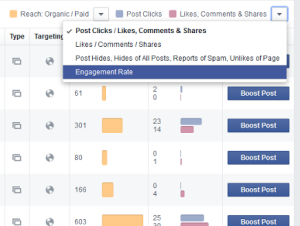
- Post Engagement – Under Posts/All Posts, click to change to show Engagement – this shows a truer snapshot of what your audience is interested in.
- Benchmarks – As you change your strategy, compare your reach and engagement to a prior period to help validate whether your strategy changes are working.
5. Stay Excited
If you are excited about your brand and your content, it will shine through in your posts. Excitement is contagious!
Take Action
Take the first step. Go to Facebook now and post something great to your audience. They’ll thank you for it!
What has worked great for your brand and your audience? Have questions about next steps? Leave a comment below and fill me in!
Want to stay up-to-date on my latest tips? Sign up now.
The post Grow Your Small Business Facebook Page With These 5 Tips appeared first on Linda Curty Web Design.
]]>The post 4 Reasons Why You Should Consider a Responsive Website appeared first on Linda Curty Web Design.
]]>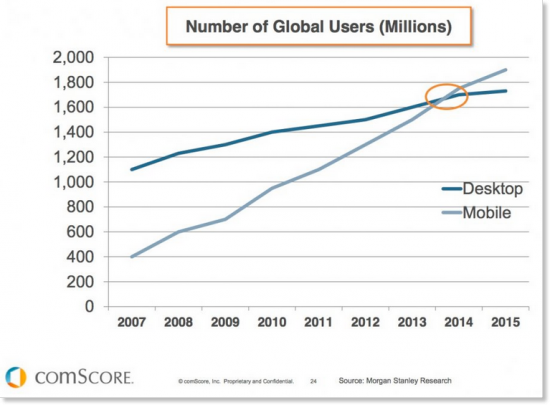 In fact, comScore states that Internet access via mobile device is now greater than access by desktop computers.
As an increasing number of people use their tablets and smartphones to surf the Web, it has become more and more important to develop websites that work seamlessly across these platforms. The way users interact with sites on these mobile devices varies significantly from how they access them from a computer. Users are now touching rather than clicking, and screen-size and pixel-resolution have become important factors. Because of these reasons and others, it has become necessary for designers to create sites that keep the look and feel of a brand’s website while simultaneously optimizing it for use across a variety of platforms.
Enter Responsive Website Design (RWD). This capability is critical websites in today’s Internet usage environment, allowing sites to be easily accessed and viewed on all of these devices. So just what is responsive design, and why do we need it?
Responsive Website Design Explained
RWD is a web design and development approach that creates a site that responds to the size of the user’s device or screen (from smartphone to tablet to laptop to large, widescreen monitor).
On responsive websites, text, images and video, layouts, and other elements, re-size themselves depending on the screen size of the device the site is being viewed on. This means brands do not need to create secondary mobile site, nor do users have to click to transition between mobile and desktop versions.
RWD has become the simplest option to connect with users across a range of mobile devices while ensuring a seamless user experience, improving Search Engine Optimization (SEO), and keeping Google happy.
One is Better than Two (or Three)
In the past, developers would create two separate versions of a site one for desktop users and one for mobile users. There are 3 main advantages to using a single responsive site versus a separate mobile site:
Cost Advantages
It costs companies more (sometimes significantly more) to build two websites than one. Additionally, the lack of navigation and content that comes with traditional mobile sites can drive frustrated customers to competitors – resulting in lost revenue for the company.
Consolidated Analytics/Reporting
Responsive website design means one consolidated analytics report. This means a broader picture of how users are accessing and using your site and easier analysis and monitoring. Furthermore, most analytics tools, such as Google Analytics, offer filtering options so that users can compare mobile access to desktop access.
Content Maintenance and Accuracy
When you are maintaining two separate sites, you often have the same content in both locations – this means making sure the content is updated correctly on both sites. A single, responsive site means less time to update and less chance of having the wrong version or different/outdated content.
User Experience
Another advantage of responsive website design is improved user experience. Regardless of what device a user is accessing the site from (be it smartphone, tablet, or desktop computer), the functionality, as well as the look and feel, is consistent. This makes it easier for users to find, read, and share content. Furthermore users aren’t redirected between mobile and desktop versions. A positive user experience leads to higher conversion rates.
Search Engine Optimization
Quite simply, Google recommends responsive website design – and with 67% of the search traffic market share, that alone is a good reason to listen.
- Having a single URL with the same code makes it easier and quicker for Google to index the site, thus reducing needed resources. Managing a single Search Engine Optimization (SEO) campaign is also easier and less expensive than managing two.
- Unique content is vital for SEO, the duplicate content that comes from placing it on separate mobile and desktop sites may have the effect of lowering your site in search engine rankings.
- The redirect to a mobile URL typically increases the amount of time it takes to load a mobile site to about 7 seconds, whereas Google looks for sites to have faster load times (ideally about 1 second). Because responsive website design eliminates the redirect to a mobile URL, your site will load more quickly on mobile devices.
The post 4 Reasons Why You Should Consider a Responsive Website appeared first on Linda Curty Web Design.
]]>